
Sloe Sailor, the app
A race instrument on the watch and phone you already own. Here is everything it does, and how to use it.
Sloe Sailor turns the watch and phone you already own into a race instrument: a start timer, your distance to the line, time to burn, speed, lifts and headers. It is free, with a free Sloe account, for as long as you keep the account. Nothing to buy, and no signal needed on the water. It is for racing, training, and messing about in boats.
App coming super soon. Sloe Sailor is in testing with a small crew, for iPhone and Apple Watch, and is not in the App Store yet. Nothing here has been proven on the water yet, so treat every number as a helper, not a ruling. Make your free Sloe account now and you are ready the day it lands. Want to test it? Write to [email protected].
What it costs
Nothing. A free Sloe account gives you the whole app, for good. With no account the app runs in demo: the demo sail, and the countdown timers. At a regatta run on Sloe, the organizer can hand you a pass that opens the whole app for that regatta, no account needed. If you like it, buy a shirt. The app stays free either way.
Get going in five minutes
- Install it. Open your TestFlight invite on your iPhone and install Sloe Sailor. The watch app comes with it; if it does not appear, open the Watch app on your iPhone and install it from Available Apps.
- Sign in. Make a free Sloe account, or sign in with the one you have, on the phone. Your watch follows.
- Open it on your watch. You land on the instrument.
- Try the demo sail first. Turn the Digital Crown down to Setup and switch on Demo sail. A made-up boat pings a line, runs a two-minute start, and beats upwind with a tack, so you can see every face on dry land. Switch it off when you are done.
- Say yes to location the first time it asks. That is where speed and the start line come from.
- Say yes to Health on the watch. The app runs a sailing workout so it stays on your wrist with the screen down. Your sail shows up in Apple Health.
The start, minute by minute
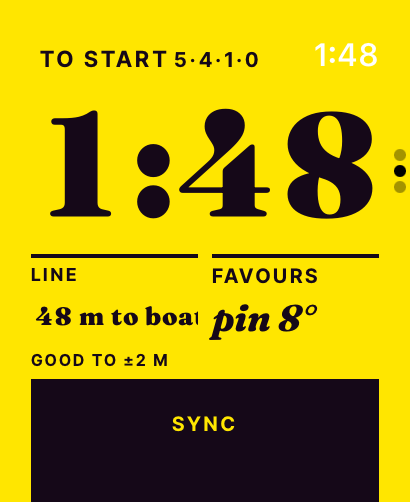
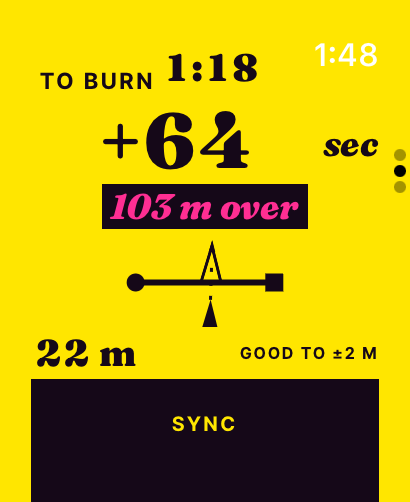
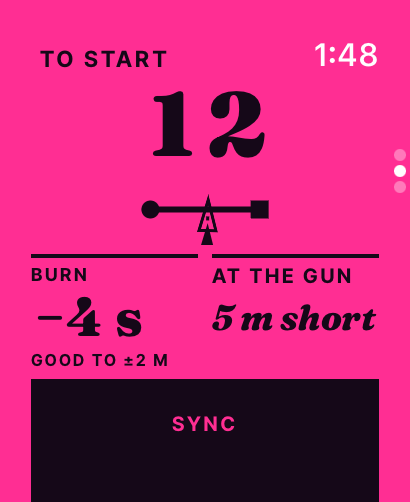
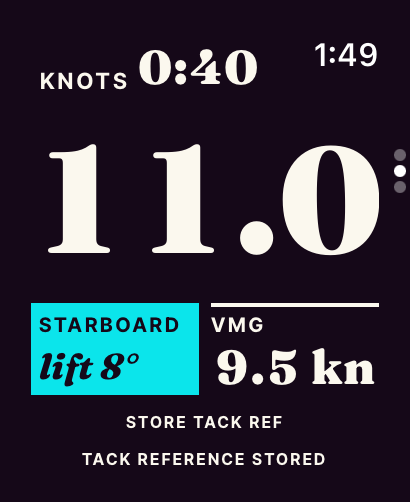
The colour of the whole face is the first reading. You know what is happening before you read a digit.
Start the clock
On the face, tap 5-4-1-0 or 3-2-1-0 at the warning signal. If you were a little off, tap Sync at the next signal and the clock snaps to the whole minute. Your wrist gets a tap at each signal.
Ping the line
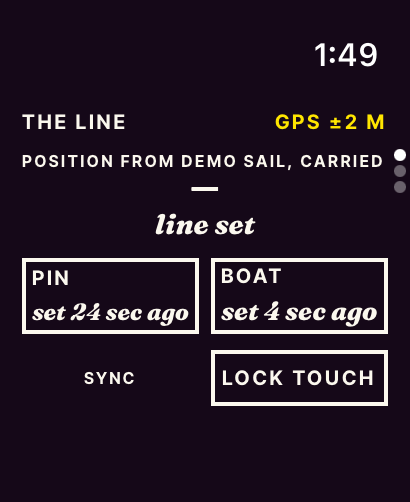
Sail past the pin and tap Pin. Sail past the committee boat and tap Boat. Each button shows when it was set, and you can ping either end again if the committee moves it. With one end missing, the watch asks for it. It never makes up a distance.
Read the approach
| You see | It means |
|---|---|
| Line 48 m | Bow to the line, square to it. “Good to ±2 m” is how far the GPS can be trusted right now. |
| Burn +9 | At this speed and course you reach the line 9 seconds before the gun. Slow down or sail a longer way. A minus number means you are late. |
| At the gun: 12 m over | Hold this speed and course and your bow is 12 metres past the line at the gun. “8 m short” means you will be behind it. “On the line” means you are inside what the GPS can tell. |
| Favours pin 8° | The pin end is closer to the wind. Needs the wind set (below). |
| Over, in a Pink frame | You are on the course side in the last minute, or were at the gun. It is a hint with its error shown. The race committee makes the call. |
After the gun
The big number is your speed in knots. Sailing upwind, press once on each tack to store that heading; from then on the watch says lift (Aqua) or header (Pink) and by how many degrees. VMG is your speed made good toward the wind.
Wind, and everything else in Setup
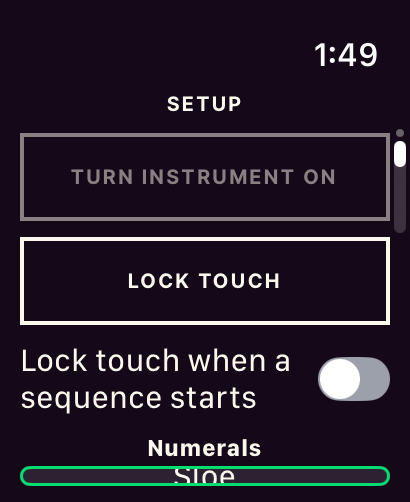
| Setting | What it does |
|---|---|
| Wind | Point the boat head to wind and tap. The watch takes your course as the wind direction, for the favoured end and VMG. |
| Racing mode | Open: everything on, for training, coaching, and fun. Timer + record or Timer only: for events whose rules limit electronics. The timer never goes away. Check your event’s rules. |
| Lock touch | Turns off the touch screen so spray cannot press anything. The face keeps running. You can have it switch on by itself when a sequence starts. |
| Sound | Beeps at each signal, on the last ten seconds, and at the gun. |
| Numerals | Sloe is the look in these pictures. Plain is a simpler face if you find it easier to read. |
| Carried or mounted | Tell the app whether the device is on you or fixed to the boat. |
| Battery or plugged in | Plugged in keeps the phone’s screen awake the whole time. |
| Demo sail | The made-up sail, for learning the faces ashore. |
Buttons, for wet hands
The app always has one next action, shown in small letters on the face: ping the missing line end, Sync during a countdown, start the sequence when nothing is running, or store a tack heading after the gun. You can do it without touching the screen:
- Double tap your thumb and finger together (Apple Watch Series 9, Ultra 2, and later).
- The Action button on an Apple Watch Ultra.
- The Action button on an iPhone (15 Pro and later): open Settings, Action Button, choose Shortcut, then pick Sloe Sailor’s Primary action.
On the phone
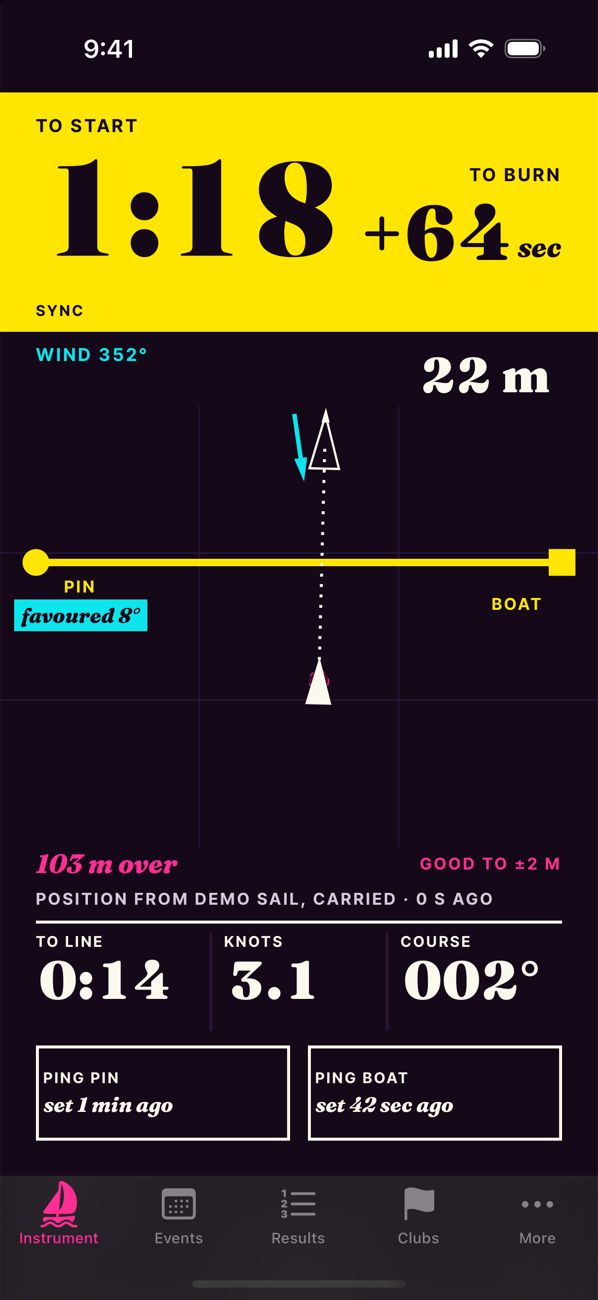
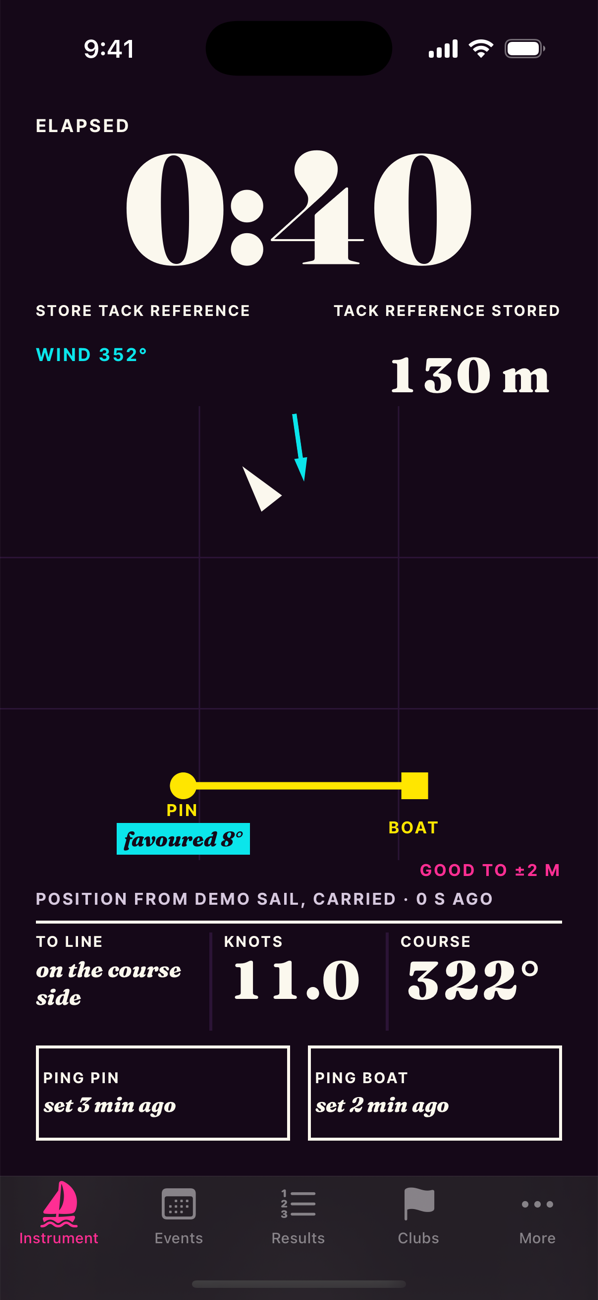
The phone and the watch each work alone, so you can leave either one ashore. Together they share the clock, the line, the wind, and your settings. Lock touch on the phone covers the screen; press and hold the marked corner for two seconds to get touch back.
What it tells you when it does not know
- When the GPS goes quiet, a number turns hollow and shows its age. After ten seconds it is gone.
- No position yet? The timer still runs. Everything else says what it is waiting for.
- Distance to the line always comes with “good to ±N m”.
Record every sail
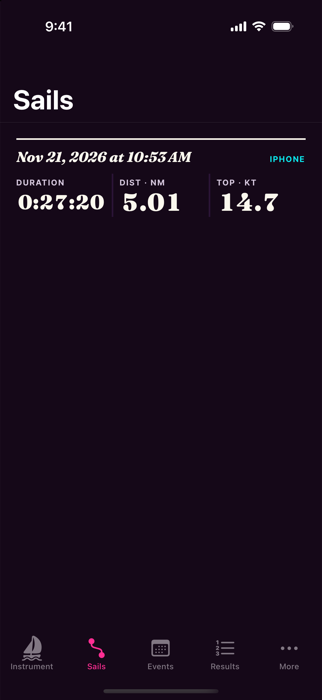
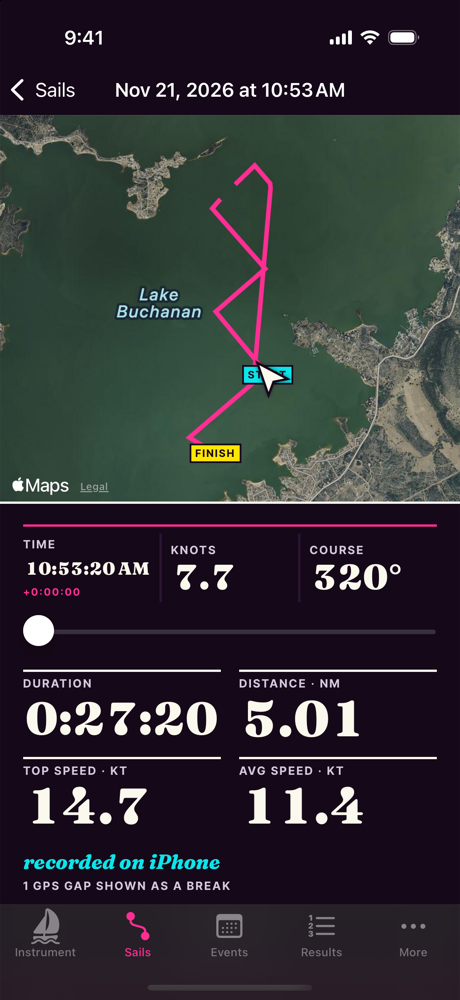
Tap Log and go sailing. Starting a countdown starts a recording too, unless you switch that off in Setup. A small Pink REC shows on every face. To stop, press and hold Log.
- What you get: the track on a satellite map, duration, distance, top speed, and average speed. Drag the slider to see your speed and course at any moment.
- Watch and phone together make one sail. Left the phone ashore? The watch records by itself and hands the sail to the phone when they are back together.
- Where it lives: on your phone, in the Files app under Sloe Sailor, and in your phone’s backup. It is yours. Sloe never deletes a sail; only you can.
- Take it with you: Export GPX gives you a file nearly every sailing and mapping tool can open.
- If the GPS dropped out, the track shows a break there. It never draws sailing it did not see.
- The demo sail is not recorded. In racing mode set to Timer only, nothing is.
Need help
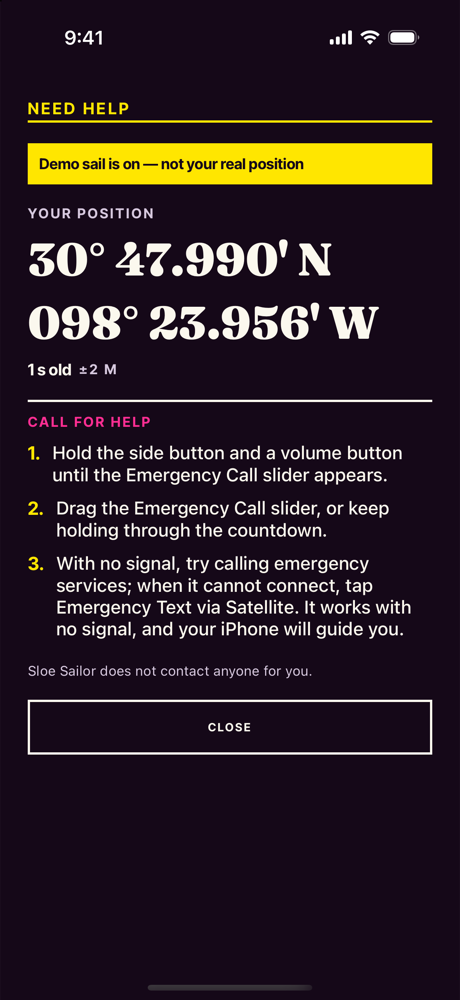
Press and hold the watch face for two seconds, or tap Need help on the phone. You get your position in large type, in the form rescuers ask for, with how old it is; the steps to call for help with that device, including by satellite where it has that; and your VHF channel if you saved one in Setup.
Sloe Sailor does not contact anyone for you. It shows you how, and gives you what to say.
Heel and trim
Fix your phone to the boat and set it to Mounted in Setup. With the boat sitting flat, tap Level once. From then on the phone shows heel (to port or to starboard) and trim (bow up or bow down). A phone in a pocket cannot do this, so the app will not pretend to. If the phone gets moved, it asks you to level again.
Regattas and your account
Signed in, your regattas show up by themselves, your sails at a regatta join its replay unless you switch that off, and the race committee can see who is on the water. Without an account you can still follow an event, follow a boat, and get the schedule and notices. The official notice board named in the Notice of Race is always the one that counts.
Coming next
- Share your track with a regatta, and replay the race against the fleet.
- Watch a race live from the beach.
- Check out, check in, and “retired, safe” straight to the race committee.